How to find and clear your browsing history on AliExpress
30.04.2024
AliExpress browsing and search history is a list of the products a shopper has browsed, as well as a list of search queries they have made on the marketplace platform. These features help shoppers keep track of their browsing and search history so they can easily return to the items or queries of interest in the future.
The browsing and search history can be useful for many purposes. For example, if you saw an item you liked but weren’t ready to make a purchase at the time, you can now find it in your browsing history or return to it later. Also, if you are looking for a particular product, the search history can help you quickly find it again without having to navigate through thousands of catalogue pages.
Our editorial team has found and researched all the available information on the subject, and is ready to share a detailed guide with our readers.
Find and clear browsing history on global AliExpress.com
Edit this title
Step
Open AliExpress.com in your browser and log in to the site using your email address and your account password;
Step
Go to “Overview” and then click on “Viewed”;
Step
The “Recently Viewed Products” section is displayed. The entire browsing history of products on AliExpress is displayed in a chronological order by day. You can also sort the list by category or display only discounted items;
Step
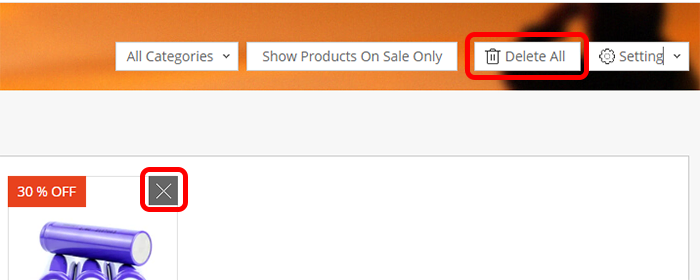
To clear the entire browsing history of products, you need to click on the “Delete All” button. To delete the goods from the timeline individually, move the cursor to the upper left-hand edge of the image of the specific item and then click on the “❌” button;
Step
If you don’t want AliExpress to save and display a list of all the products you’ve viewed – use “Setting” and then click on “Turn off Recently Viewed Products”.
Normally, browsing and search history on AliExpress is stored in the user’s account and can be easily accessed at any time.
View and delete browsing history in AliExpress mobile app
This section will be relevant for customers who use the “<strong>AliExpress by Alibaba</strong>” mobile app in the <a href=”https://apps.apple.com/ua/app/aliexpress-by-alibaba/id436672029″ target=”_blank” rel=”noreferrer noopener”>App Store</a> or <a href=”https://play.google.com/store/apps/details?id=com.alibaba.aliexpresshd” target=”_blank” rel=”noreferrer noopener”>Google Play</a> catalogue.
Step
Open the mobile app and go to “My profile“;
Step
Go down the tab to the “Wishlist” and then tap on “History“;
Step
The app will display the most recently viewed items. Click on “View All” to open a separate tab with a chronology of items viewed by day;
Step
You can sort the list of viewed products in the History tab by specific dates. Viewing data is stored for up to 60 days, after which it is deleted irretrievably;
Step
To deactivate the browsing history in the mobile app, you need to open “Settings” and then go to the “History” tab. Click on the switch to disable the feature and delete all your browsing history.
Also, search and browsing history can be used by AliExpress to provide product recommendations based on your preferences. This feature helps make shopping more personalised and convenient.
The browsing history on the website and the mobile app is automatically synchronised. That is, the products viewed on the website go into the history in the app and vice versa. To clear the browsing history of products in your account, follow the instructions for the website or mobile app.
It may take some time for the AliExpress recommendation system to change the list of recommended items based on your preferences. Look for new types of items more often so that the marketplace forgets about previous searches.
We previously posted about PCS on AliExpress, explaining the meaning of this marker.
Frequently Asked Questions
How can I view product browsing history on AliExpress?
The product browsing history on AliExpress is available both on the website and in the mobile app. The data is automatically synchronized between both platforms.
How do I delete my browsing history on AliExpress?
The AliExpress website allows you to delete individual items from the history as well as the entire list of viewed items. In the Aliexpress mobile app, the product browsing history can only be cleared completely using the settings.
How to find and clear the search history on AliExpress?
You can find your search history by clicking on the search bar on the website and in the Aliexpress mobile app. You can delete your searches in the same pop-up.
Use the comments below the post to ask more questions. We will try to answer them in detail.
Active user of AliExpress since 2018. I create high-quality and unique content on the topic of shopping on the Chinese marketplace. I help other people solve problems with their orders.